
"Replace your employees with AI!"
This is the sort of headline going around and the implication is that AI can do... anything, and everything. There's several problems with that idea, but we're going to focus on the thought that AI somehow innately knows how your business works so it can easily start replacing employees.
In short, it doesn't work like that, and I'm going to explain how it does work as simply and quickly as possible
You can carefully train AI on your business, but even then, it can't sit down at a desk and start working (yes there's a few things that are nearly there, but even if they were done, you don't want to turn them on yet. I can explain more later).
AI needs to be hooked up to your systems, carefully instructed on what to do and how, and then tested, tested again, and tested some more. It is not an easy button to eliminate people, and it will actually initially add people. Who is going to hook your systems into AI and train it? Developers, technical resources, and the likelihood that the people on your current payroll are qualified to do a great job at this is highly unlikely (even if they are absolutely convinced they can do it).
Later, once your AI systems are up and humming along, things change, things break, and now you need whoever created all of this stuff to be around to support it. How much labor did we truly eliminate? The answer can be quite a bit, but it can also be none. Worse yet, it can be none, and we may have spent tens or hundreds of thousands of dollars trying to do it.
What I'm getting at is "AI" is not interchangeable with "Automation"
The word "automation" has been nearly completely replaced with "AI" on the internet, but they are not the same thing. Automation is the concept of tying together systems and processes, and replacing, or reducing, the need for manual labor (people). AI is mostly used (at this point in time) as one of those systems inside of the concept of automation, and is not automation itself.
Essentially, this means that calling automation "AI" is about the same thing as calling a battery a smartphone. Yes it's part of what makes a smartphone, it even has a critical role in the smartphone, but it's not a smartphone.
I've said this before, but this is a quick reminder that I am not against using AI
I use AI daily, and the potential and even current abilities of AI are nothing short of incredible. I say that to make sure it's clear that AI can be great in your business, but it's not a magic bullet as advertised. Most of what we see is marketing or chest puffing from CEOs making outrageous claims about employees they completely eliminated with AI in a viable sustainable way.
What I can tell you is if they were able to eliminate a large amount of their employees with AI, their company was over or wrongly staffed (with small exceptions) in the first place and something about AI made them come to the realization of how repetitive and predictable the tasks for their employees were... which makes them a great use case for automation even before AI viably existed.
The repetitive and predictable parts are what people like me drool over because we know this is the basis for great automation. Unfortunately, repetitive and predictable is a luxury a lot of processes in your business don't have (but if they do exist for you, you need to be thinking AUTOMATION!).
AI makes it easier and possible to go further with automation in plenty of ways, but we didn't need AI to do a lot of the automation that likely eliminated those jobs (if it's even true in the first place).
So where does AI sit in the automation strategy? How can I properly leverage it?
Reference Figure A below as we go through this.
- Task: All automation starts with something that needs to be done, we're calling that a "Task"
- AI Zone: What automated process we call depends on what the task is... so, what is the task, and how does the task know which Process Automation is used to accomplish it? Before AI, this was a very static (set and does not change) path. Since AI exists now, it can be a huge help here. I'm calling this the "AI Zone". Before AI, if it wasn't static, it required a person or a combination of complex code and other mechanisms to determine which automation it should kick off.
- Process Automation: These are automations created to do specific tasks in your business. Maybe after someone submits a form on your website an email is automatically sent to them saying thank you, and maybe that email also includes a PDF. This is a classic example of process automation, and how it was triggered was "static" because the act of submitting the form kicked off that automation so it's always the same. If that same interaction had the user fill out a big text box about their business and then submit it, which PDF you want to send them may vary depending on what they said in that text box. This would be a great place for AI to step in, read what they wrote, and take out the potential manual labor of a person reading it and deciding how we should respond.
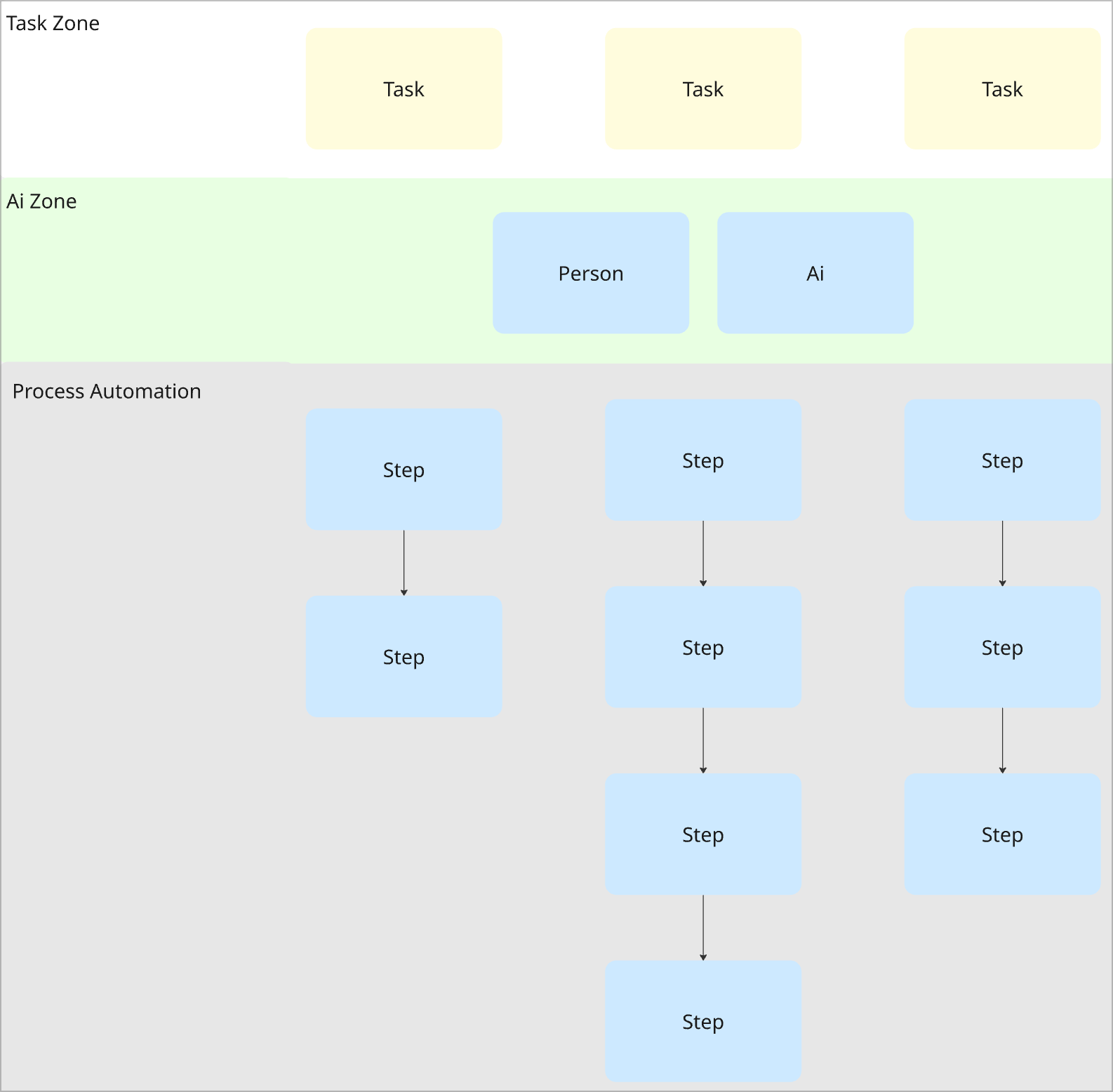
Process automation
The most important part to understand in Figure A is Process Automation. To automate any process, you have to have that process documented on how you manually do it. I actually wrote all about this in depth in my blog Automation 3 step framework, considerations, and expectations so I won't re-hash this entire concept, but here's an excerpt that will quickly sum up my thoughts here:
We do not want to automate anything until there is a known, documented, tested process for solving it manually. If all of those conditions are not true, we should absolutely, under no circumstances, begin automating anything. Why? Automating is taking the steps that would be performed manually and creating them in code. This means that if no one has a set way they do it manually, we have no set way for how we should develop it. If it's pushed to be developed anyway, we're creating and testing our process through development. This is expensive and time consuming. Don't do it.
- Me (is it weird to quote yourself?)
What I did not cover in that automation blog is where AI comes into the mix. Every single one of those "Steps" in Figure A may come to decision points. These decision points would land back in the "AI Zone" in Figure A. Meaning, automation did some stuff, a result came back, and a decision needs to be made. These decision points could generally be automated if they were incredibly predictable, but if not, it goes to a human. This is where AI can shine because it can read through the results of what that automation came back with, know the goal it's ultimately supposed to get to, then kick off the proper automation to accomplish that goal instead of involving a human. Essentially, our "Process Automation" in Figure A can keep hopping back to our "AI Zone" to handle these decision points instead of a person.
Notice though that the AI didn't magically go do the thing that needed to be done... it needed to fire off the automation to do it. The automation had to have been built previously, tested, and proven to produce the result we wanted. This means AI just potentially eliminated the decision points in the "AI Zone", not the process automation at all. Starting to make sense why the CEO that suddenly AI'd everything and fired his team seems a bit suspicious?
Real life
I'm saying a lot of stuff in abstract terms here and I want to make sure this is easily grasped by even completely non-technical people, so here is my best shot at a simple way to imagine everything I just said.
Think of AI in everything we've covered so far as ChatGPT. With that in mind, let's go through a quick scenario.
AI usage scenario
- Initial interaction
A potential customer reaches out to you via your info@yourcompany.com email address and asks if you provide CPA services for healthcare businesses that do over $10mil revenue. If you do, they would like some references, and would like to set a meeting. - What the use of AI in Automation could look like
When the email arrives, we could have automation built to examine the email before it's sent to a real person. It may look something like this:- When email is received, send the email contents to ChatGPT
- ChatGPT, go through the email and see if they mention any verticals we specialize in for CPA services like legal or medical. If it's legal save the legal services PDF, if it's medical save the medical services PDF. Keep the right file ready to go for the email we're going to write.
- Automations to go through your file storage for applicable documents kicks in
- ChatGPT, if they asked for a meeting, grab the link to my calendar and find a few upcoming day/times that I have available to kick off the scheduling conversation. Save the link and the days/time for the email we're going to write.
- Automations for reaching out to Calendly or your calendar service kick in
- ChatGPT, examine the email for anything special the customer is asking for that we may have available. If we have anything relevant, read through these resources and write an email with applicable snippets but reword them to sound natural. If you previously had email attachments from the last step, or the calendar link and days and times, make sure those are on this email too. Also don't send the email yet, just write the draft, get the attachments and calendar info and save it to my drafts then send me a text message to let me know I have a draft to review. I'll hit send if it all looks good. Some resources we have available are:
- This list of testimonials
- This list of awards
- This article published about us
- etc.
- Automations to look through learned content for ChatGPT kick in
Cool right? Previously to read that description and work through the multiple decision points ("AI Zone" in Figure A) to find the right files, days and times on the calendar, or find files to attachment would have all been manual. We replaced a person in the reading of that description, and the actions to do the right things all the way up until final review. Nice.
Now imagine throughout the course of automations you've made across your business, there may be thousands of decision points throughout any given day that previously required a person. We could feasibly replace all, or at least several of those decision points with AI. Amazing.
But what did AI do, and what did it not do? In all of this, it facilitated decision making where a person would have previously had to make that decision. It did not go do the thing that needed to be done. This means the actions, the heavy lifting was in... the process automation, not the AI. AI did not single handedly, with the click of a button, replace employees.
This isn't exhaustive, just an example
AI can be incredibly effective in a lot of ways that I'm not covering here. For example, a lot of automations can be made much simpler and faster with huge help from AI. So what is true is that making automation is a LOT easier today with AI than it was without it. But you do still have to make the automations. You still have to test them. You still have to have your processes documented, tested, and proven to make those automations in the first place.
AI is making a lot of things easier, but it's not a magic bullet that cuts your payroll in half.
What's my point to all of this?
Don't get conned by AI hype. My hope is that you leave this blog with an understanding of what AI can, and cannot do so when you're being sold a world of promises, you're grounded in some reality.
Keep in mind that if you read all of this, you likely know more than the sales person promising you that you're wrong. It's important to remember that their sales people can be just as wrong as your sales people! They make bad promises sometimes– not because they're malicious (mostly), but because they're truly confident in what it can do, and may be ignorant to what it cannot.
That being said, let's talk about some cool AI stuff that truly is just great.
Pre-built AI tools (software/SaaS etc)
Last thing I want to cover is the fact that there are a ton of incredibly useful AI tools that already exist for you that you truly can just turn on and use without the headaches I've described above. There's caveats all over the place to every new tool you turn on for your business though, so as a CTO, I'm cautioning you to move slower than you'd like to when adopting new things. Your "small" decisions have ripple effects that are not immediately obvious.
- Nearly everything you turn on and start using gets access to your company data, and you don't know how well they protect that data for you and your clients. If there's a breach, whose fault is that? When the client comes after you, how do you defend yourself on the thing you purchased and trusted with all of their sensitive information from a LinkedIn or Instagram ad?
- Getting everyone in your company using the tool and going through that training / learning process is a real expense, and can have ripple effects to your clients when your business makes mistakes since it's all new– include that time when calculating your total cost to implement.
- Everything you make a part of your daily workflow is now a component of your business that needs to continue to exist and needs to be supported when it breaks. Who supports it? Is the support usable? Do they respond quickly?
- Make careful decisions when the tool you choose puts itself inside of your critical business operations in any way. If it goes down for a day, two days, a month... what happens to your business? How long has the tool existed that you're choosing? Software companies fail every single day, will they still be around next year, next month, or even next week?
- If you have any custom process automation and you add new tools, you'll likely have to modify or make new automations to include the new things you've started using... and then hope you continue using them so you didn't waste the time and money of integrating them into your business and automations.
Some of my favorite pre-built, just "turn on" AI tools
- ChatGPT
https://chatgpt.com
I use a lot of AI chatbots, but ChatGPT still tends to be my go-to and most dependable. I highly recommend purchasing the Teams plan for your team instead of letting everyone use their own rogue AI. If you're not providing it, they're using something anyway but you don't know which one... not great. Bite the bullet and pay the money. - Krisp
https://krisp.ai
Krisp is a noise cancelling software for your mic and speakers that also transcribes all of your meetings, AI summarizes them, creates to-dos, can record audio and video from your calls, and overall it just works and is a great value. It even has an accent remover for some countries where you may have remote workers in real-time while they're on zoom calls or similar... crazy stuff! - Scribe
https://scribehow.com
Automated documentation/SOP creation and it's honestly amazing. - Lovable
https://lovable.dev
Lovable is full AI automated app development. This is amazing when used correctly as an application prototyping platform. This is not a great production application platform (even though a ton of apps exist in production on here). Essentially, if you have an app idea, inside of maybe $30 and a couple days you can have a working app on the internet that does the things you imagined. If you've been considering paying for custom development for your business, this is a fantastic way to "visualize" it and see if your ideas have merit, or if once it exists it's lackluster and unimportant.
If you move past this visualize / prototype phase, please get a trusted, real development team to make your production app. There's a lot of downstream consequences to publishing something completely made by AI that is another blog entirely. I have a dev team, and trust me profits would be much more impressive if we could just speak apps into existence that we trusted to run long term and be safe/sustainable on Lovable. - Google Flow
https://labs.google/flow
If you haven't seen this, prepare to have your mind absolutely blown. This is video generation and the quality is unbelievable. It's not perfect in plenty of ways, but this is the kind of stuff that is changing the world for better or worse. - Headshot Pro
https://www.headshotpro.com
Let me first say that the idea of uploading your face or others to anything AI absolutely means they're selling your biometric data in some way. I hate that, so it makes me almost not even post this one... but unfortunately, your face is all over the internet and they didn't really need you to use this to get it. That being said, if privacy is a concern, skip this one.
Use case wise, you can generate incredibly realistic and accurate headshots of your entire team, going from low quality photos to professional headshots at a fraction of the cost of hiring a photographer. This really shines when geo location is an issue– like overseas staff etc, but you want a unified headshot look/feel for everyone. - ChatGPT GPTs
https://chatgpt.com
This is generally under utilized so I'm giving it it's own call out. Inside of ChatGPT, you can create your own GPTs by feeding it documents of your company SOPs, runbooks, sales process, marketing guidelines, employee handbook... anything you can think of. You can keep it private to yourself, then choose who you share with. You can then have a chatbot that answers questions based off of the context and data you've given it. It's simple to use, and if you spend enough time in the training it can be incredibly accurate and effective.
I still avoid giving ChatGPT any truly sensitive data because AI data safety/security is all a mess, so keep that in mind while using anything AI!
Wrap up
If you enjoyed this and/or if it brought you value in any way, please consider subscribing on this page. If you really enjoyed it, please consider a paid subscription. It's basically buying me a coffee a month and makes me feel less like I'm screaming my thoughts into the void. When I post a blog in the future it will send it right to your email– no spam. Thanks for reading!